Every fee on the page.
Cancel within 60 days of your first charge, and your money comes back automatically.
How the guarantee works →Replace scattered texts, emails, and paper notes with one parent communication app. Families get real-time messages, daily reports, photos, and announcements.
Book a demoSet up in an afternoon · 60-day money-back · See the price

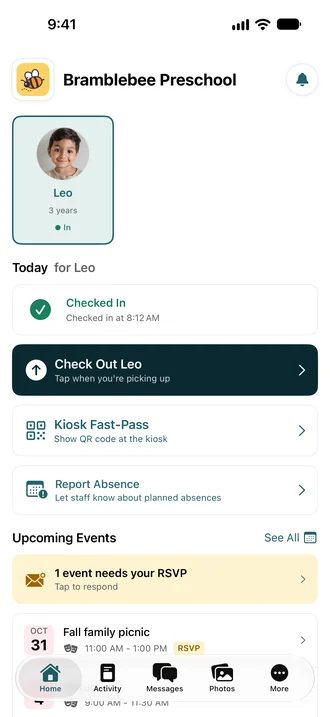
Keep families informed and engaged with your center.
Secure in-app messaging between parents and staff. Conversations are organized by child and classroom, with read receipts so you know messages were seen.
Staff log meals, naps, diaper changes, and activities throughout the day. Parents receive a complete summary with a push notification when the report is ready.
Capture and share moments from the classroom. Parents see photos organized by child and date. All media is stored securely.
Send center-wide announcements, classroom updates, or targeted messages to specific families. Share closures, events, and policy changes.
Parents get instant push notifications for messages, daily reports, photos, and announcements. No more wondering if families saw your email.
Share upcoming events, holidays, and important dates with parents through an in-app calendar. Parents can RSVP and add events to their personal calendar.

A parent communication app is a dedicated tool for daycare centers. It shares updates, messages, photos, and reports with families. Instead of personal texts, email chains, and paper flyers, it all lives in one organized system.
Bloomily gives parents a dedicated app. There they see daily activity reports, classroom photos, announcements, and direct messages from their child's teacher. For staff, it means no more juggling personal phone numbers. And no more repeating the same update to every parent at pickup.
See how a parent communication app changes every interaction with families.
| Old Way | With Bloomily |
|---|---|
| Sending individual texts to each parent | Broadcast messages to classrooms or the whole center |
| Parents missing paper notes in backpacks | Push notifications ensure parents see every update |
| No record of what was communicated | Complete message history, searchable and exportable |
| Staff using personal phones for parent texts | Professional in-app messaging keeps boundaries clear |
| Handwriting daily report sheets | Digital daily reports filled out on a tablet in minutes |
| Parents asking "How was my child's day?" | Parents get real-time photos and activity updates |
A parent communication app connects your daycare staff with families through messaging, daily reports, photo sharing, and announcements. It replaces scattered texts, emails, and paper notes with one organized app.
Staff log activities throughout the day on their tablet or phone. Parents receive a push notification when the daily report is ready. They can view meals, naps, activities, and notes in the parent app.
Yes. Bloomily includes secure in-app messaging organized by child and classroom. Directors can monitor conversations for quality assurance. Staff never need to share personal phone numbers.
Yes. Staff can capture and share photos and videos. Media is organized by child and date, stored securely, and only visible to authorized family members.
Yes. Messaging, daily reports, photo sharing, and announcements come with every Bloomily plan. See your exact price on our pricing page.
Secure messaging by child and classroom
Logged once, read at pickup
Real-time tracking and ratios
The whole center, one system
One price per location
Trusted by schools, camps and home daycares




Three things directors ask before they start, answered where you can read them.
Cancel within 60 days of your first charge, and your money comes back automatically.
How the guarantee works →AI help is built in, plus full support from our team. Turn it on in Settings, and it answers from your own records.
How AI help works →Encrypted on the way and at rest. Each program’s records are walled off. We never hold card numbers.
Trust and security →Set up in an afternoon.