Every fee on the page.
Cancel within 60 days of your first charge, and your money comes back automatically.
How the guarantee works →Bloomily is camp registration software for day camps and summer camps. Families pick weeks, sign forms and pay a deposit online.
Book a demoSet up in an afternoon · 60-day money-back · See the price

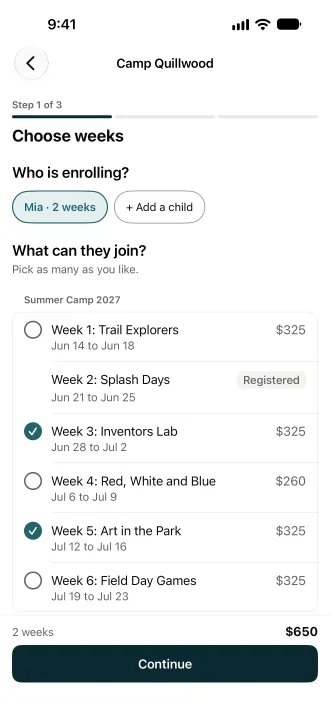
Camp registration software lets families sign up for camp weeks online and pay for them. In Bloomily, each week has its own price and its own places. Families pick weeks on their phone, fill in your forms and pay a deposit. The balance bill is made for you, due the Friday before the week. A full week keeps a waiting list. It is for day camps and summer camps. When a family cancels, your office decides any refund.
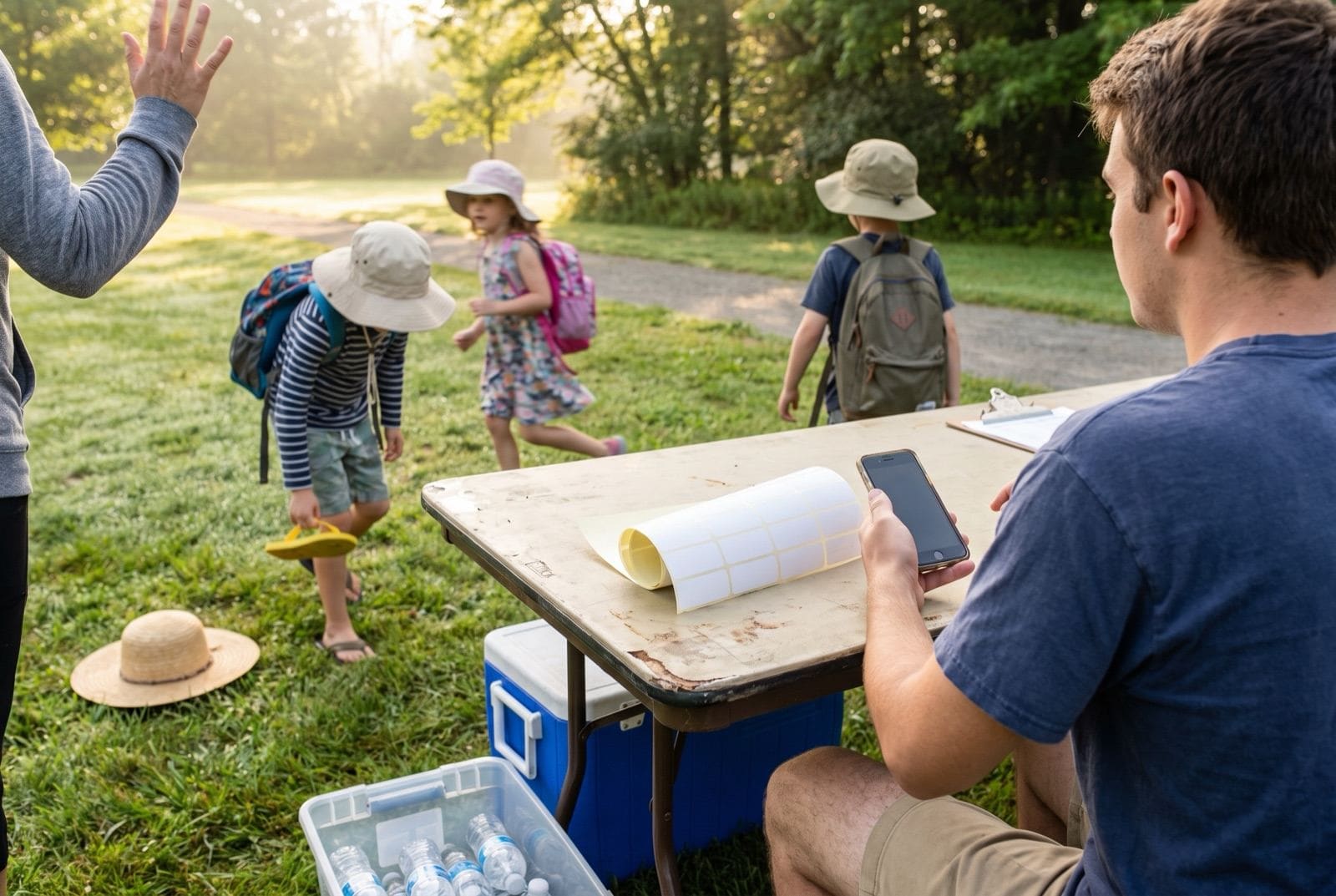
Each week has its own price and its own places. A full week keeps a waiting list.
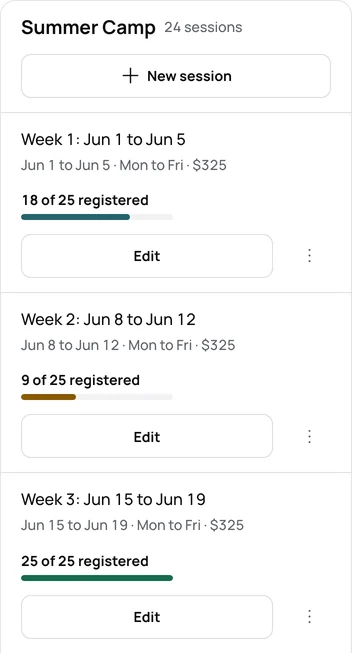
Families open your registration page on their phone and pick the weeks they want.
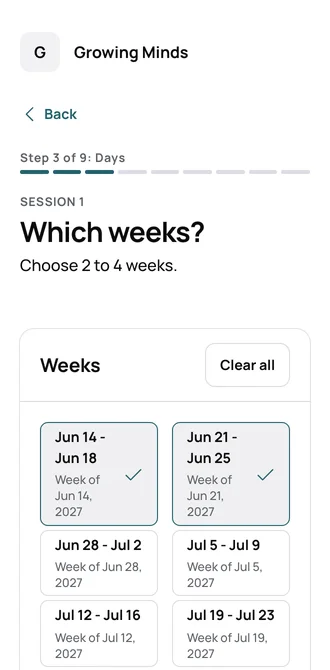
Families fill in and sign your forms while they register.
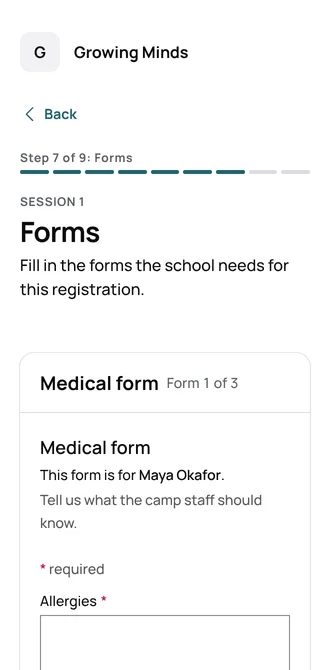
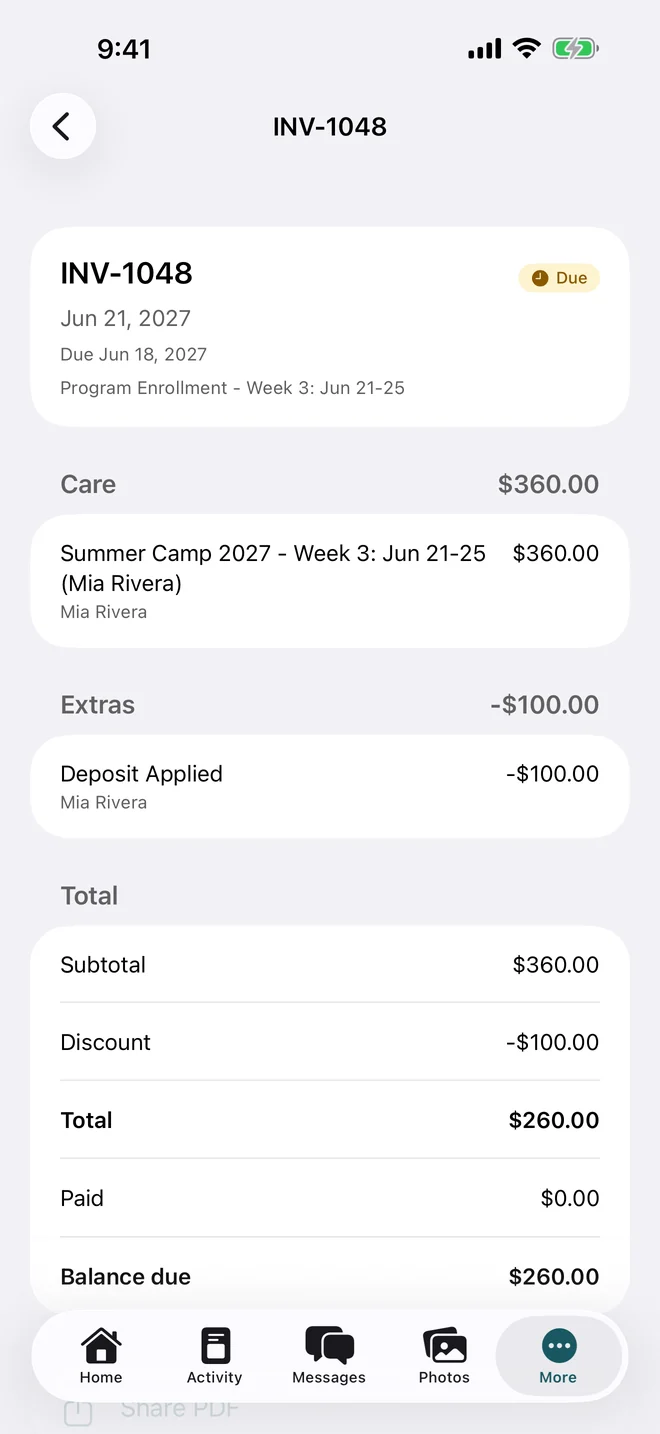
Families pay a deposit to hold the week. The balance bill is made for you, due the Friday before.
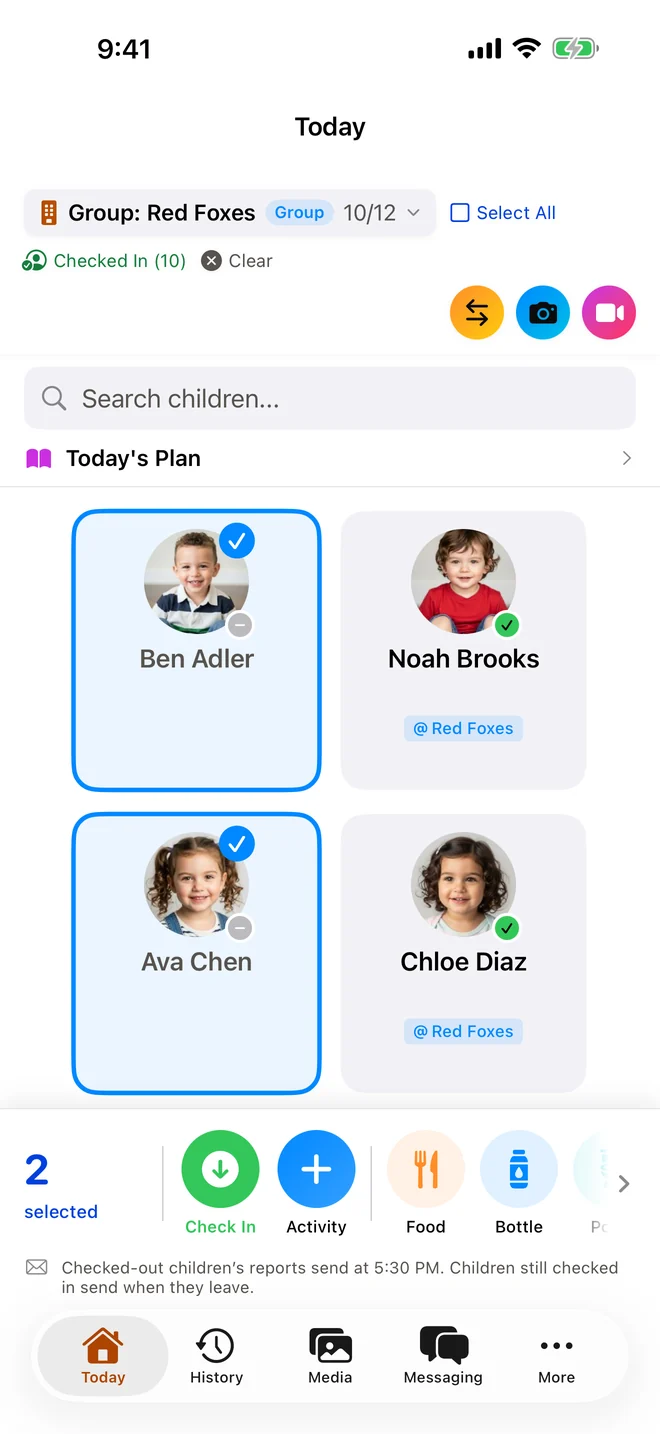
Counselors check campers in and out from Bloomily Center on iPhone.
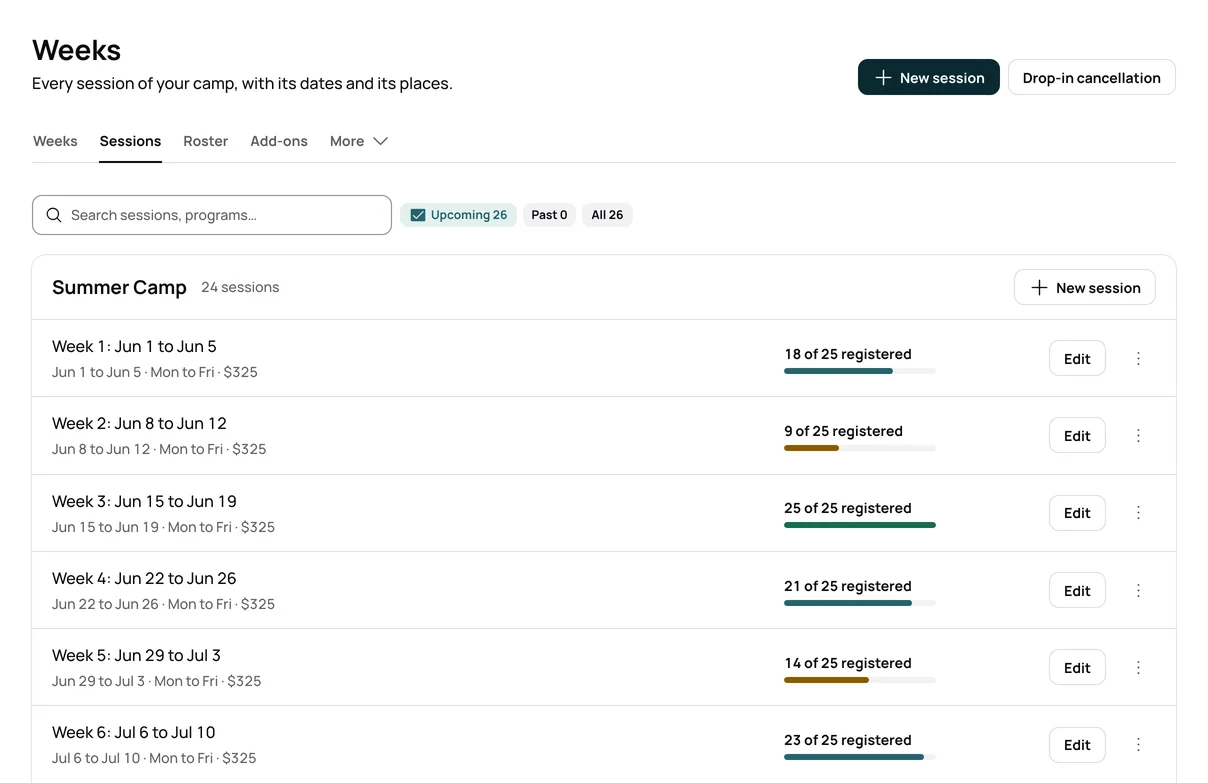
Each week has its own price and its own capacity.
A full week keeps a waiting list. When a place opens, the next family gets it.
Families pay in full, pay a deposit, or choose a payment plan your camp offers.
The deposit comes off the balance bill, due the Friday before the week.
Families fill in and sign your camp forms when they register.
Sibling discounts, early-bird prices and promo codes apply at checkout.
Families check in and out at the kiosk with a PIN, or on their own phone.
Campers sit in groups, and counselors share a photo album with each group.
| Forms, a spreadsheet and a payment link | With Bloomily |
|---|---|
| A form per family, typed into a spreadsheet | Families pick weeks and fill in forms themselves |
| Counting each week by hand | Each week shows its count and its places |
| A waiting list in a notebook | A waiting list for each full week |
| Working out each balance by hand | The deposit comes off the balance bill |
| Paper waivers in a binder | Signed forms kept on each camper’s record |
When a family cancels, your office cancels the week and picks any refund.
Your camp chooses whether to offer one. Autopay starts only when the family agrees.
You can set the fewest and the most weeks a family may pick.
Counselors check campers in from Bloomily Center on iPhone and iPad.
Set up your weeks, prices and forms in an afternoon. Then share your registration page with families.
The same weeks, forms, and check-in. The day looks different.
Children come for the day and go home at night.
Before and after care can be an add-on.
A bus route can be a form question.
Families register for the weeks they want.
Each week has its own price and its own capacity.
Overnight camps use the same weeks, forms, and check-in.
Campers sit in groups, with a counselor and a count.
Check-in, tuition and the school day
Pickups after the school day
A visit, without a weekly seat
Families open your registration page on their phone. They pick weeks, fill in forms and pay a deposit.
Yes. Families enroll in camp weeks online, sign your forms and pay a deposit.
Yes. A family picks the weeks they want, and each week keeps its own price. You can set how many they may pick.
Yes. Each week has its own places and its own count.
Yes. Families pay a deposit at registration. The balance bill is made for you, due the Friday before the week.
Yes, if you set one. Sibling discounts and early-bird prices apply at checkout.
It keeps a waiting list. When a place opens, the next family gets it.
Your office cancels the week for the family and picks how much to refund, if anything. A refund goes back to how the family paid.
It runs camp from sign-up to pickup. Bloomily covers registration, payments, forms, check-in, groups, and family messages.
Families check in and out at the kiosk with a PIN, or on their own phone. Counselors use the staff app on iPhone.
One price per camp, however many campers you have. The price is on the camp pricing page. More than one camp? The price is quoted in writing.
No. The price is per camp, however many campers you have.
The processing fee is 3.5% on cards, plus $0.30 on payments under $60, and 1% on bank transfers. A bank transfer fee is at least $0.50 and never more than $8.
Yes. Day camps, summer camps, and overnight camps use the same weeks and check-in.
Run more than one kind of program? Book a demo.
You can set up in an afternoon.
Day camps: state permit. Overnight camps: state permit.
Day camps: depends on the program. Overnight camps: state license.
Day camps: depends on the program. Overnight camps: depends on the program.
Day camps: depends on the program. Overnight camps: state camp rules.
Day camps: state license. Overnight camps: state license.
Day camps: state license. Overnight camps: state license.
Day camps: state permit. Overnight camps: state permit.
Day camps: no state license. Overnight camps: state permit.
Day camps: depends on the program. Overnight camps: depends on the program.
Day camps: depends on the program. Overnight camps: depends on the program.
Day camps: state license. Overnight camps: state license.
Day camps: depends on the program. Overnight camps: state camp rules.
Day camps: state permit. Overnight camps: state permit.
Day camps: state permit. Overnight camps: state permit.
Day camps: state license. Overnight camps: state license.
Day camps: state certificate. Overnight camps: state certificate.
Day camps: state license. Overnight camps: state license.
Day camps: state license. Overnight camps: state license.
Day camps: depends on the program. Overnight camps: state license.
Day camps: depends on the program. Overnight camps: depends on the program.
Day camps: depends on the program. Overnight camps: state license.
Day camps: depends on the program. Overnight camps: no state license.
Day camps: depends on the program. Overnight camps: state license.
Day camps: state license. Overnight camps: state license.
Day camps: state certificate. Overnight camps: state certificate.
Day camps: state permit. Overnight camps: state permit.
Day camps: depends on the program. Overnight camps: depends on the program.
Day camps: state registration. Overnight camps: state permit.
Day camps: state license. Overnight camps: state license.
Day camps: depends on the program. Overnight camps: depends on the program.
Day camps: depends on the program. Overnight camps: depends on the program.
Day camps: state permit. Overnight camps: state permit.
Day camps: state license. Overnight camps: state license.
Day camps: depends on the program. Overnight camps: state license.
Day camps: depends on the program. Overnight camps: state permit.
Day camps: depends on the program. Overnight camps: state registration.
Day camps: depends on the program. Overnight camps: state permit.
Day camps: depends on the program. Overnight camps: state license.
Prepare your forms, dates, and family instructions
Editable answers for the questions families ask
A free printable form
A free printable list for families
Check-in, groups and pickups on camp days
Pickups, attendance and tuition after the bell
Youth camps run by a city or county
Sessions, capacity, and waitlists
One price per camp
Cards and bank transfers
Trusted by schools, camps and home daycares




Three things directors ask before they start, answered where you can read them.
Cancel within 60 days of your first charge, and your money comes back automatically.
How the guarantee works →AI help is built in, plus full support from our team. Turn it on in Settings, and it answers from your own records.
How AI help works →Encrypted on the way and at rest. Each program’s records are walled off. We never hold card numbers.
Trust and security →Set up in an afternoon.